
-
CAD Models
-
- CAD Model: CGH-S9-C9_A.step
- CAD Model: CGH-S9-C0_A.step
- CAD Model: CGH-S6-C6_A.step
- CAD Model: CGH-S6-C0_A.step
- CAD Model: CGH-S3-C6_A.step
- CAD Model: CGH-S3-C3_A.step
- CAD Model: CGH-S3-C0_A.step
- CAD Model: C6XXXC_A.step
- CAD Model: C4XXXC_A.step
- CAD Model: C3XXXs_A.step
- CAD Model: C2XXXS-BC.step 2-Inch Cylinder CGH
-
-
Documentation
-
- Customer Drawing: MP6-BLANK_A
- Customer Drawing: MP3-BLANK_A
- Customer Drawing: VRT-050_A
- Customer Drawing: CRT-050_A
- Customer Drawing: C6AC3_A
- Customer Drawing: C6R_A
- Customer Drawing: FP9-H600_A
- Customer Drawing: FP6-H600_B
- Customer Drawing: FP6-H425_B
- Customer Drawing: FP3-Z-H600_B
- Customer Drawing: FP3-Z-H425_B
- Customer Drawing: FP3-H600_A
- Customer Drawing: FP3-H425_A
- Customer Drawing: CGH-S9-C9_A
- Customer Drawing: CGH-S9-C0_A
- Customer Drawing: CGH-S6-C6_A
- Customer Drawing: CGH-S6-C0_A
- Customer Drawing: CGH-S3-C6_A
- Customer Drawing: CGH-S3-C3_A
- Customer Drawing: CGH-S3-C0_A
- Customer Drawing: C6XXXC_A
- Customer Drawing: C4XXXC_A
- Customer Drawing: C3XXXS_A
- Customer Drawing: C2XXXS-BC 2-Inch Cylinder CGH
- Customer Drawing: FP6-Z-H650_A
- Show Remaining Articles ( 10 ) Collapse Articles
-
-
- About Morpheus and Installation
- 1. Preparing Metrology Measurements for Morpheus™
- 2. Loading Data into Morpheus™
- 3. Processing the Data in Morpheus™
- 4. Substrate Correction
- 5. Mapping Correction
- 6. Fitting and Removing Alignment Errors
- 7. Analyzing Uncertainty Stack-up
- 8. Generating a Report
- 9. Exporting Data
- 10. Reporting Feedback
- 11. Reporting a Bug
- Glossary
- About
- AOM Software License Agreement
-
-
-
Publications
-
- [2025] Metrology for efficient assembly, integration, and testing of space telescopes
- [2025] Rethinking alignment for systems that incorporate freeform optics
- [2025] Parametric relations for coupling wavefront measurements, mechanical misalignment, and operational performance for imaging systems
- [2025] Kinematic interfaces for freeform optics for efficient manufacture, test, and system assembly
- [2025] Applications of computer generated holograms for measuring X-ray and EUV optics
- [2023] New Applications of Computer Generated Holograms for Optical Testing
- [2023] Rapid surface metrology of freeform shapes using CGH interferometry
- [2022] Snapshot measurements with CGH interferometry to support volume production of freeform optics
- [2022] Computer generated hologram (CGH) education kit for hands-on learning of optical metrology for complex optics and systems
- [2022] CGH-assisted metrology testbed for the Thirty Meter Telescope primary mirror
- [2021] Metrology Testbed for the Thirty Meter Telescope Primary Mirror
- [2019] Interferometric Metrology for the TMT Primary Mirror Segments: Design and Analysis
- [2018] Infrared computer-generated holograms: design and application for the WFIRST grism using wavelength-tuning interferometry
- [2016] Optical Alignment with CGH Phase References
- [2014] Precision Alignment And Calibration Of Optical Systems Using Computer Generated Holograms
- [2014] Diffractive optics calibrator: measurement of etching variations for binary computer-generated holograms
- [2013] Optical testing with computer generated holograms: comprehensive error analysis
- [2013] Design and analysis of an alignment procedure using computer-generated holograms
- [2011] Low uncertainty alignment procedure using computer generated holograms
- [2010] Imaging issues for interferometry with CGH null correctors
- [2010] Measurement of aspheric mirror segments using Fizeau interferometry with CGH correction
- [2009] Fizeau interferometer with spherical reference and CGH correction for measuring large convex aspheres
- [2007] Fabrication error analysis and experimental demonstration for computer-generated holograms
- [2007] Optical alignment with computer-generated holograms
- [2007] Optimal design of computer-generated holograms to minimize sensitivity to fabrication errors
- [2007] Coupling of surface roughness to the performance of computer-generated holograms
- [2006] Analysis of phase sensitivity for binary computer-generated holograms
- [2006] Absolute calibration of null correctors using twin computer-generated holograms
- [2006] Use of computer generated holograms for alignment of complex null correctors
- [2005] Testing an off-axis parabola with a CGH and a spherical mirror as null lens
- [2004] Efficient testing of segmented aspherical mirrors by use of reference plate and computer-generated holograms. I. Theory and system optimization
- [2004] Efficient testing of segmented aspherical mirrors by use of a reference plate and computer-generated holograms. II. Case study, error analysis, and experimental validation
- [1999] Efficient testing of off-axis aspheres with test plates and computer-generated holograms
- [1999] Error analysis for CGH optical testing
- [1999] Diffraction wavefront analysis of computer-generated holograms
- [1995] Applications of computer-generated holograms for interferometric measurement of large aspheric optics
- Show Remaining Articles ( 21 ) Collapse Articles
-
-
FAQs
-
- What is a CGH (Computer-Generated Hologram)?
- How are CGHs used?
- What is a "null"?
- What is a "UUT"?
- How is a CGH mounted and adjusted?
- What types of surfaces can be measured using a CGH?
- What is the typical accuracy of a CGH?
- What are the benefits of using a CGH for metrology?
- What is CGH substrate error and how does it get subtracted?
- What are fiducial dots and how are they used?
- Are CGHs delicate?
- How do you clean a CGH?
- What is a Metrology Platform?
- What type of interferometer do I need to use a CGH?
- What is diffraction efficiency?
- What is the difference between an amplitude and a phase CGH?
- How is a CGH different from other types of holograms?
- What size CGHs does AOM produce?
- Do CGHs require regular calibration?
- How are CGHs made?
- Show Remaining Articles ( 5 ) Collapse Articles
-
-
How-To's
-
- What is a Datum?
- The Importance of UUT Alignment
- [VIDEO] Freeform CGH Metrology Demonstration: Step-by-Step Instructions
- [VIDEO] Metrology Platform for Easy and Precise Alignment in Freeform Optical Testing
- [VIDEO] Aligning a CGH Test
- [VIDEO] How to Measure a Cylinder Optic
- UUT Datum and Optical Coordinate Definitions
- CGH Test Alignment Correction with Morpheus
- [2026] Datum Based Metrology for Freeform Optics
-
Technologies
-
-
- Arc Focus Reference Alignment Patterns (AF)
- Crosshair Point Focus (PF-X)
- Line Focus Reference Alignment Patterns (LF)
- Confocal Point Focus Alignment Pattern (PF-C)
- Catseye Pair Alignment Pattern (CE-P)
- Catseye Single Alignment Pattern (CE-S)
- Collimation Alignment Pattern (CO)
- Visual Point Focus Alignment Pattern (PF-V)
-
-
After you have processed your data in Morpheus™, you are ready to export your data to a file. Morpheus™ will export your processed data to the same format as the imported data.
The Morpheus™ window is shown below after all data processing has occurred.
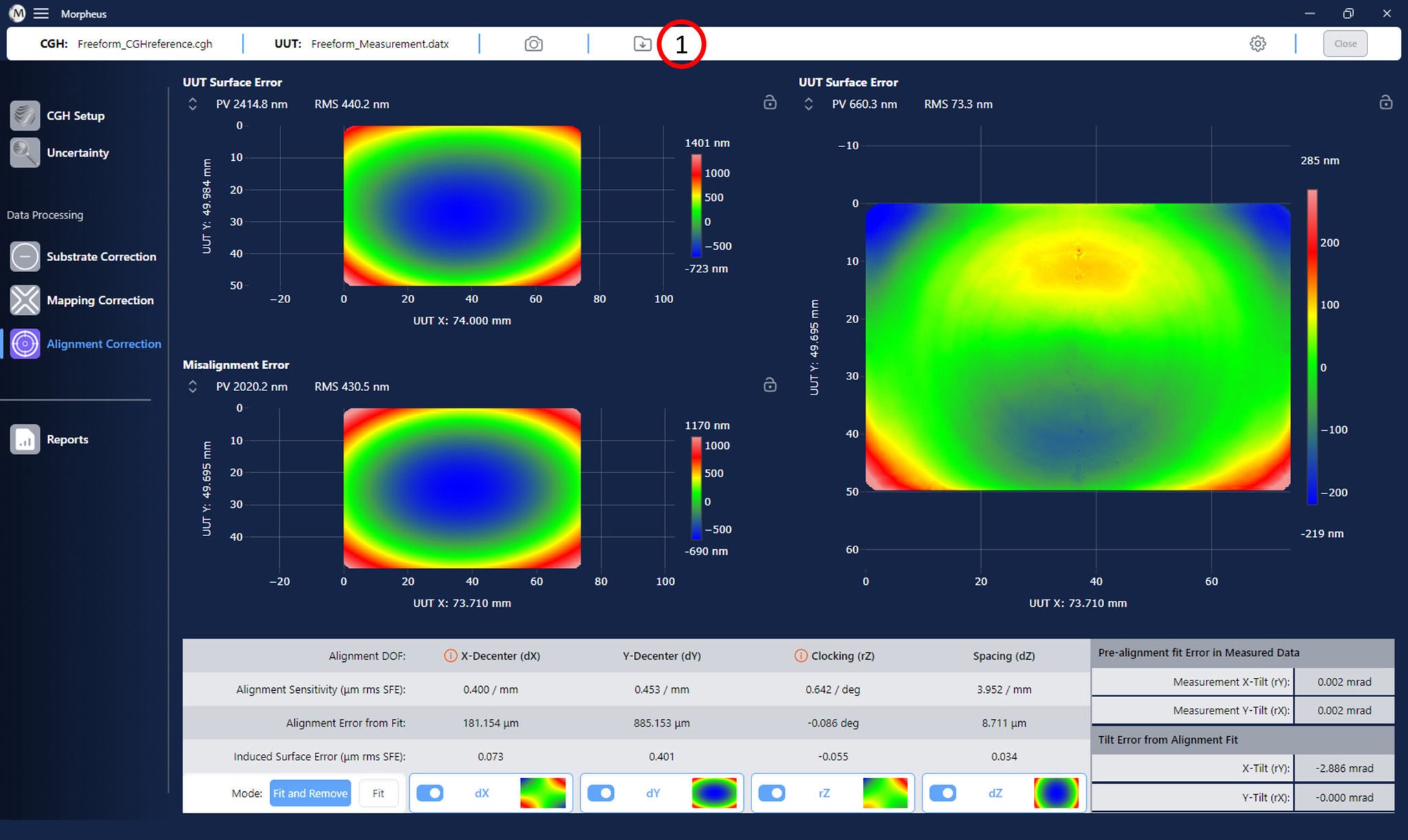
To export your data, click on the ‘Export’ button in the toolbar of the Morpheus™ window (1). You will be prompted to choose a location and provide the name of the exported processed data. Once you have chosen a location and provided a name, click ‘Save’ to export your data.
Next Steps
You are now completed will all steps in the Morpheus™ processing pipeline!
To report feedback and suggestions, please see the Reporting Feedback section of this manual.
To report a bug, please see the Reporting a Bug section of this manual.